Xero login problem, from the real cause to the fix
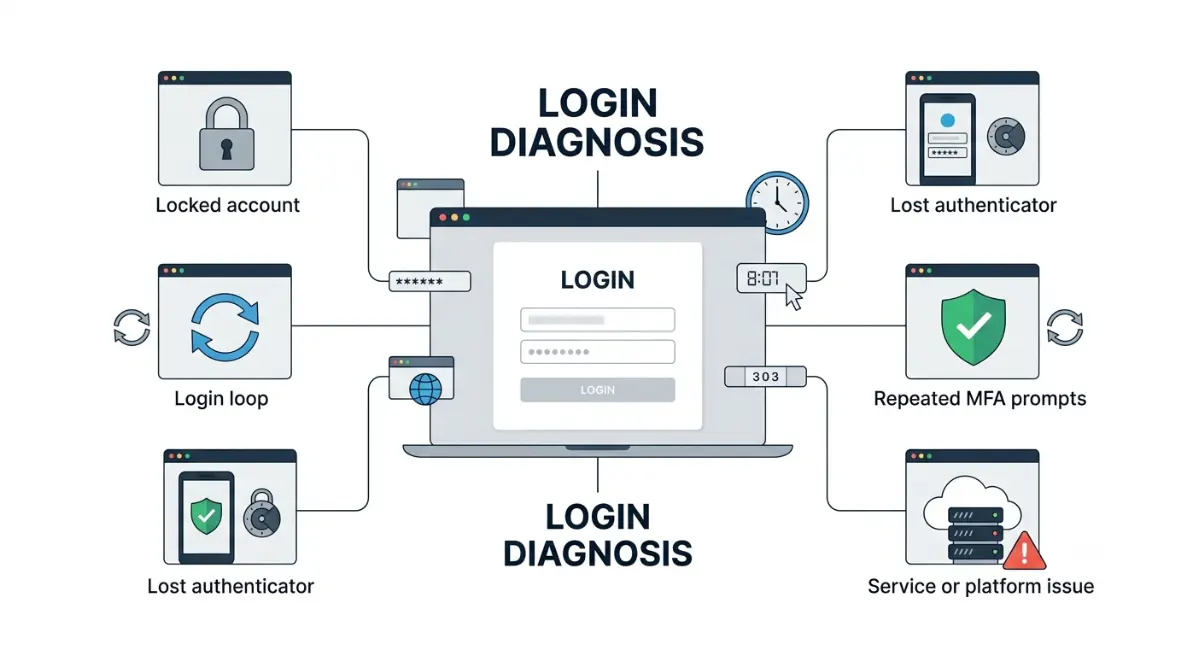
Table of Contents
Xero locks your account after five failed login attempts, including failed MFA attempts, and you wait 15 minutes before retrying — Xero’s MFA troubleshooting page, retrieved 8 September 2026. If you are not locked but keep returning to the login screen, start with the bookmark you used: Xero documents that only its login page should be bookmarked, and an old one produces exactly this loop.
Which Xero lockout you’re actually in
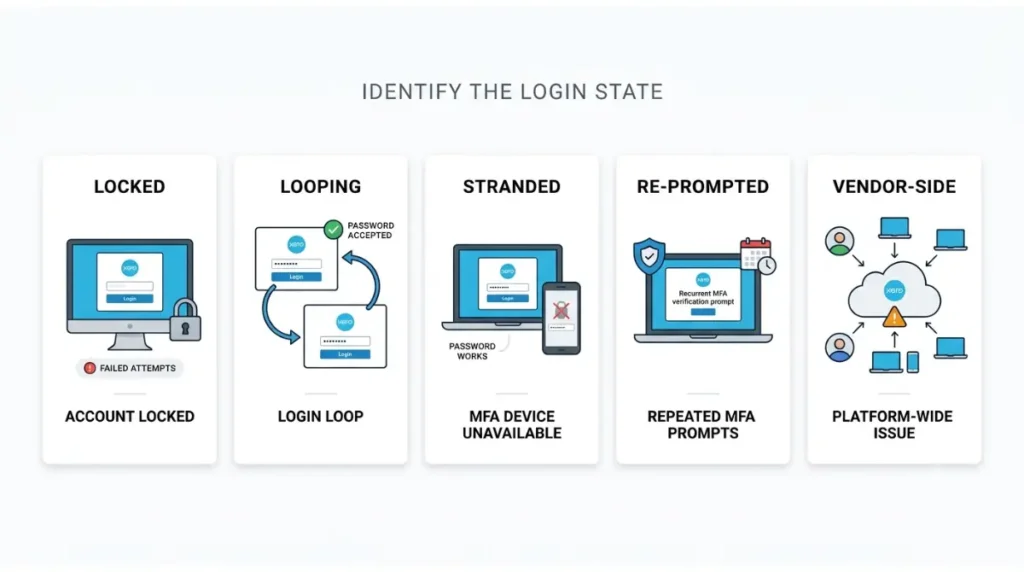
Five states share one symptom, and the fix for each is different. Find yours before you spend an attempt.
| State | What you see | Where it’s resolved |
|---|---|---|
| Locked | Login refused after repeated tries | Wait it out — see the opening |
| Looping | Password accepted, back at login | Sections 2 and 3 |
| Stranded | Password fine, authenticator gone | Sections 3 and 4 |
| Re-prompted | Working, but asks every day | Section 6 |
| Vendor-side | Nothing works, for anyone | Section 5 |
If you can log in but cannot open an organisation or reach a feature, that is not a login problem — it is your role, and it is covered in Xero user roles and permissions.
What actually causes a Xero login loop
Xero’s own documentation names the causes, and none of them require guesswork.
The browser causes
Xero recommends bookmarking only its login page, and says a bookmark that returns an error should be deleted and recreated. After an email or password change, a browser holding old stored credentials will keep replaying them. If your workplace blocks Xero’s domains at the firewall or proxy, your administrator has to allow them — see Xero’s login troubleshooting article.
The clock cause, and who it applies to
💵 Verified: Cookies and JavaScript must be enabled, and your device’s system time must match its time zone — Xero’s technical requirements, retrieved 8 September 2026.
🔍 Why It Works This Way: Third-party authenticator codes are generated from the clock, so a manually-set device produces a code that is arithmetically correct and rejected anyway. Xero states this affects apps like Google Authenticator, and that Xero Verify does not show this invalid code error — Xero’s MFA FAQs, retrieved 8 September 2026.
Why there is no backup code to find
Xero documents two backup methods: a code sent to your backup email address, or your security questions — Xero’s MFA explainer, retrieved 8 September 2026. Some third-party guides still tell locked-out readers to enter a backup code. No backup-code mechanism appears in Xero’s MFA documentation as retrieved on that date.
The fixes, in the order that risks least
Work down this list. Each step is reversible until the one that isn’t, and that one is marked.
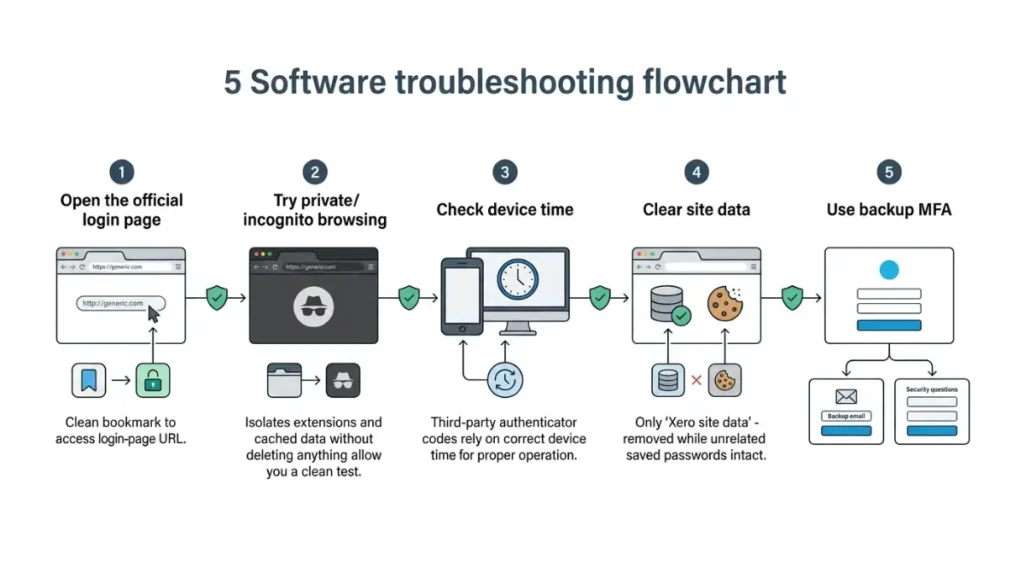
- Open Xero’s login page directly rather than through a saved bookmark, then replace the bookmark with that address.
- Try a private or incognito window. This isolates extensions and cached data without deleting anything.
- If your code is being rejected and you use a third-party authenticator, set your device’s time to automatic and try again.
🛟 Back This Up First: Before clearing cookies, export or write down any passwords your browser is holding. Xero notes that clearing the Passwords category removes every saved password in that browser, not only its Xero one. Clear site data for Xero’s domain alone if your browser allows it.
- Clear cookies and cached data for Xero, then close and reopen the browser.
- If your authenticator app is gone, log in with your email and password, choose the option to use a backup method, and authenticate with your backup email or security questions.
🛟 Back This Up First: Only remove the old device from Account settings once you are logged in and have your replacement authenticator installed. Removing it first leaves the backup method as your only route in.
Getting Xero to reset your MFA
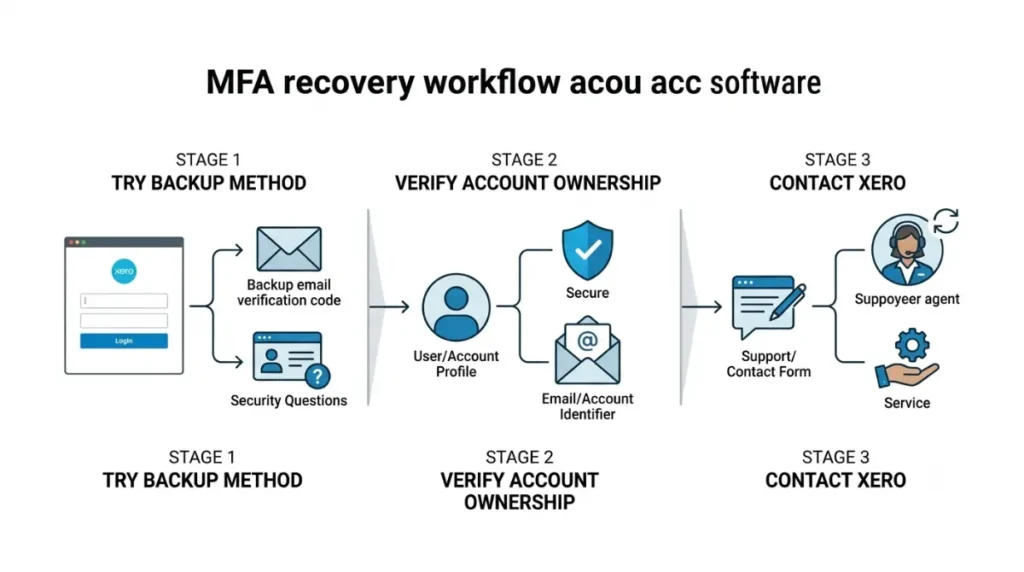
This is where self-service ends. If your backup method also fails, Xero has to act, and it will not act until four conditions are met.
What Xero requires before it will reset
You must have made attempts to log in using your backup method first. You must enter your Xero user email address on the contact form. You must prove you own the account. Xero’s route for this is its MFA case form. On turnaround, Xero says to log a case immediately and that someone should be in touch within a few hours, and to say what you have already tried — its published MFA FAQs, retrieved 8 September 2026.
Why your accountant can’t do this for you
Xero states it can reset MFA only for the requester’s own account, not another user’s. An advisor holding a client’s lockout cannot resolve it; the account holder has to raise the case themselves. The same ownership logic governs who may end a subscription, covered in what it costs to cancel Xero.
How to tell if the problem is Xero’s
Check this before you spend another attempt, because nothing you do locally fixes a platform fault.
Where Xero publishes its own state
Xero’s system status page lists Xero Platform and Settings, Xero Central and Xero Verify as separate components, so you can see whether the authentication app itself is affected. At retrieval on 8 September 2026 all systems showed operational, and no login-related incident appeared between 24 August and that date.
The route that needs no login
That same page carries a can’t-login form: you enter your Xero login email address and Xero gets in touch. It is the only contact route documented that does not assume you are already inside.
Why Xero asks again tomorrow
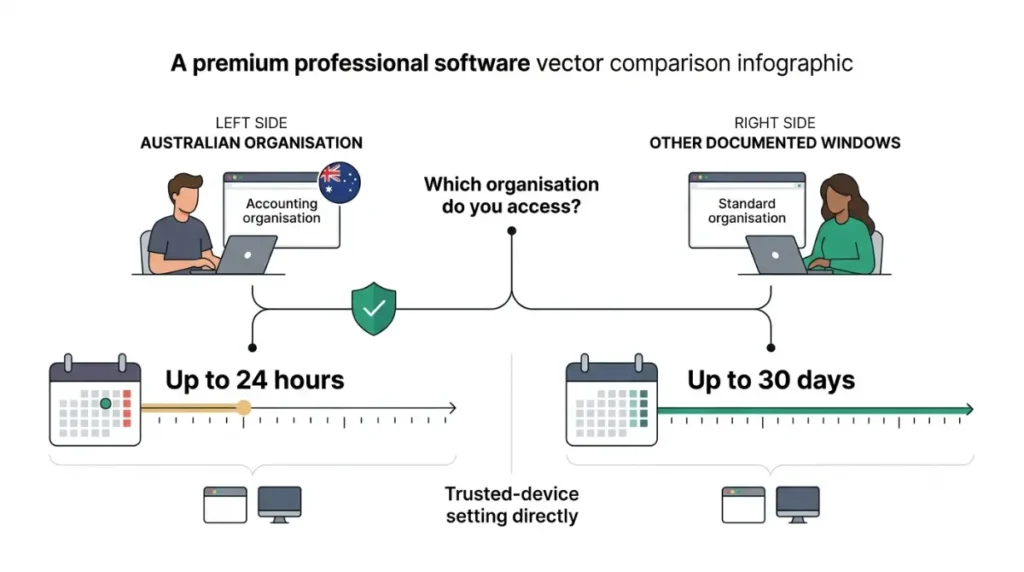
Nothing is broken. Xero publishes two different trusted device windows, and which one applies to you depends on your organisations, not your location.
| Xero surface | Documented window | Retrieved |
|---|---|---|
| MFA troubleshooting article (AU) | Up to 24 hours | 8 September 2026 |
| MFA explainer (UK/US/CA/SG/SA/ROW) | Up to 30 days | 8 September 2026 |
| Multi-factor authentication FAQs (US) | 30 days | 8 September 2026 |
💵 Verified: The AU article states the shorter window was introduced to comply with ATO regulations and applies to anyone globally who accesses an Australian organisation, even a single one. The other two surfaces do not mention that override — all three retrieved 8 September 2026.
If you touch one Australian organisation, the daily prompt is the product working correctly and no setting ends it. The checkbox is also tied to the specific computer and browser you ticked it on, and Xero states it is not designed to work when you log in with a backup method. Turning MFA off is not available — Xero states it is mandatory.
⚠️ This Costs You: Xero states that sharing one login means far more frequent authentication prompts, and that access to some key functionality might be blocked because the activity can be classified as suspicious. If several people use one set of credentials, that is a cause, and separate user invitations are the fix.
🧾 Not Tested: We hold no Xero subscription, so no screen behind the login was seen or captured. Every figure above comes from Xero’s own pages retrieved on 8 September 2026. Xero Central renders via JavaScript, so our page captures are pending and listed for the editor. We could not establish a Xero Verify app version or a documented history of past login-infrastructure incidents, and have written neither.
Xero login questions, answered
1. How many failed attempts before Xero locks you out?
Five unsuccessful attempts, including failed MFA attempts. Wait 15 minutes, then try again.
2. Does Xero give you backup codes?
No. Xero documents a backup email address or security questions as its two backup methods.
3. Why does Xero ask for 2FA every day?
Because you access an Australian organisation, which caps the trusted-device window at 24 hours.
4. Can my accountant reset my Xero MFA?
No. Xero resets MFA only for the account holder who raises the case, not another user’s account.
5. I’ve lost my phone — how do I get into Xero?
Log in, choose the backup method option, then use your backup email or security questions.
6. Is Xero down, or is it my account?
Check Xero’s status page. It lists Xero Verify and platform components separately.
7. Which browsers does Xero support?
Latest Firefox, Safari, Chrome, Edge and Samsung Internet, with cookies and JavaScript enabled.
8. Why is my correct authenticator code rejected?
A manually-set device clock. Xero says this affects third-party apps, not Xero Verify.
9. How long does an MFA reset take?
Xero says to log a case immediately and someone should be in touch within a few hours.
10. Can I turn MFA off in Xero?
No. Xero states MFA is mandatory if you want to continue using the product
What to do next
Match your state, run the matching fix, and stop at the point where Xero has to act. Every figure here came from Xero’s own pages on 8 September 2026 and links to its source. If the lockout has turned into a larger question, what Xero costs and what leaving costs covers the rest.