Xero duplicate bank transactions: how to find and clear them
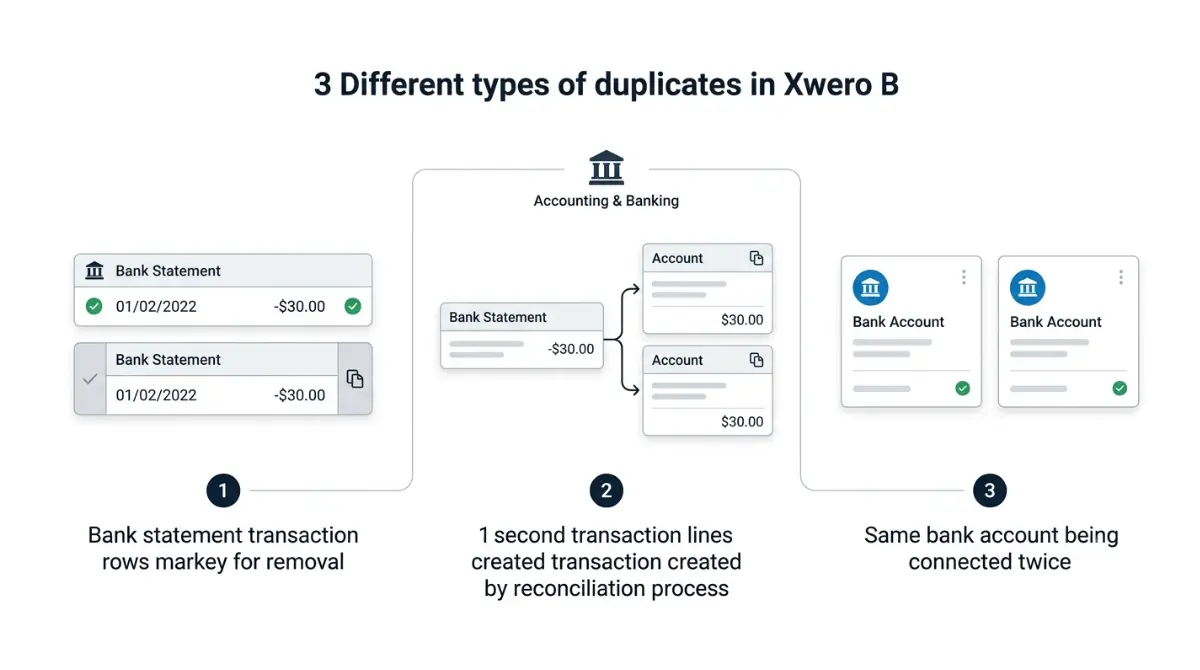
Table of Contents
Xero calls three different problems “duplicate bank transactions”, and each has a different fix. A duplicated statement line is deleted from the Bank Statements tab. A duplicated account transaction you created while reconciling is deleted instead — not unreconciled. A bank account connected twice is a separate Xero article entirely. Xero’s help documentation confirms Xero will not delete duplicates for you (retrieved 7 September 2026).
Three different things get called a duplicate
Work out which one you have before you delete anything. Xero’s documentation, retrieved 7 September 2026, treats these as three separate problems.
| What you’re seeing | Xero’s name for it | Where it lives | What clears it |
|---|---|---|---|
| The same line twice in Reconcile | Duplicate bank statement line | Bank Statements tab | Delete one line — Section 3 |
| A second entry you made while reconciling | Duplicate account transaction | Account Transactions tab | Delete the transaction — Section 4 |
| The whole account listed twice | Duplicate bank account | Bank accounts screen | Xero’s separate guidance — not covered here |
A duplicated statement line
The bank sent it once and Xero holds it twice. This is the common case.
A duplicated transaction you created
The bank sent one line; you made a second record against it. Deleting the line makes this worse.
A bank account connected twice
Xero documents this separately and we could not retrieve those steps, so this article does not give them.
Why Xero ends up with the same line twice
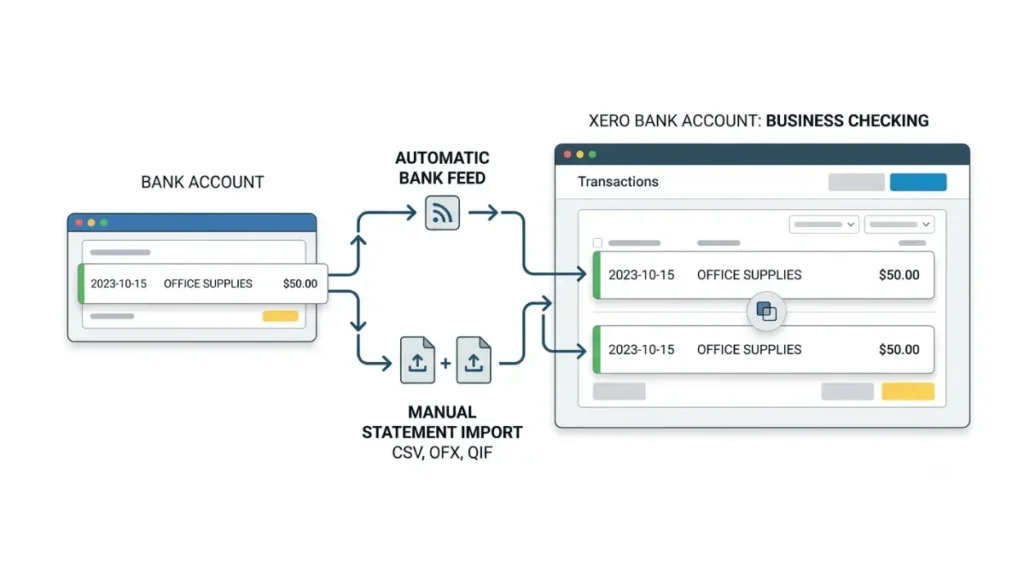
Duplicate statement lines happen when one statement reaches Xero by two routes.
A manual import landing on top of a feed
Xero’s guidance on duplicate statement lines, retrieved 7 September 2026, names the cause directly: a statement manually imported into an organisation that also receives the same period through a bank feed. Importing a CSV, OFX or QIF file covering dates the feed already delivered gives you a second copy of every line.
A statement balance that stops matching
Where the statement balance in Xero differs from your actual bank balance, Xero documents that as a sign duplicates have been imported (retrieved 7 September 2026). On a Yodlee feed, refresh the feed first — otherwise you are comparing against a stale balance.
🔍 Why It Works This Way: Xero catches some duplicates at the import stage and removes them automatically. The ones you can still see are the ones that check did not match, which is why they need finding rather than waiting out.
How to delete a duplicate bank statement line
🛟 Back This Up First: Before deleting anything, export the bank account’s transactions to a file and save a copy of the current Bank Reconciliation report. Deleting a statement line changes the balance in Xero, and you will want the before-picture if the result is wrong.
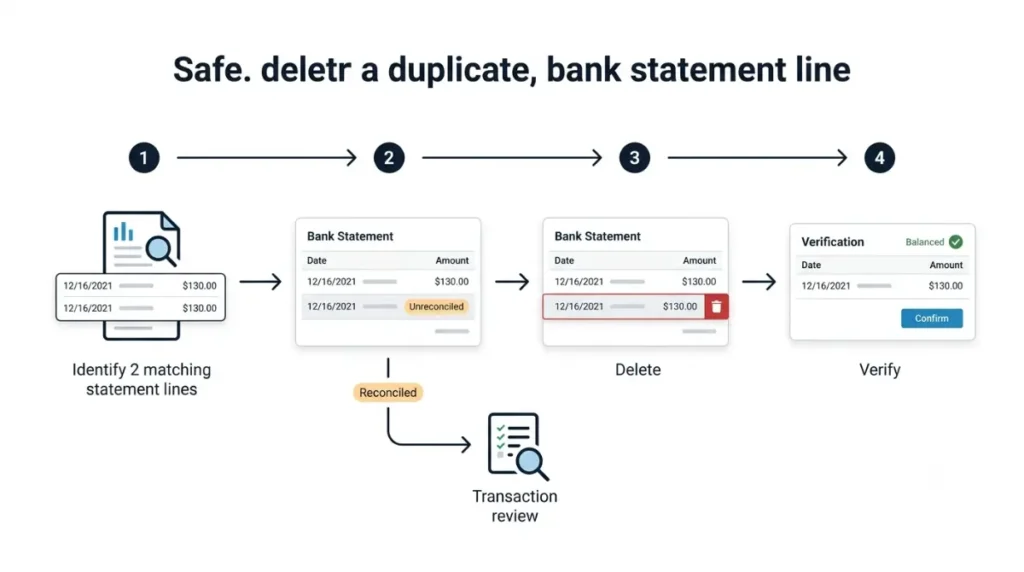
- Confirm it is a duplicate. Run the Duplicate Statement Lines report, which compares the date and amount of statement lines in one bank account and flags potential duplicates (Xero documentation, retrieved 7 September 2026). It does not show partial matches, or duplicates Xero already removed at import.
- Open the account’s Bank Statements tab. Xero documents reaching bank accounts through the Accounting menu (retrieved 7 September 2026). Lines show in date order, newest first, with a Status column reading Unreconciled, Reconciled or Deleted, per Xero’s guide to the Bank Statements tab.
- Delete the duplicate where its status is Unreconciled. A line showing Reconciled is a different job — Section 5.
- Where an entire statement imported twice, delete the whole statement rather than working line by line (Xero documentation, retrieved 7 September 2026).
- Check the statement balance in Xero now matches the balance in Xero. Xero names this as the closing check.
When it’s a duplicate transaction, not a duplicate line
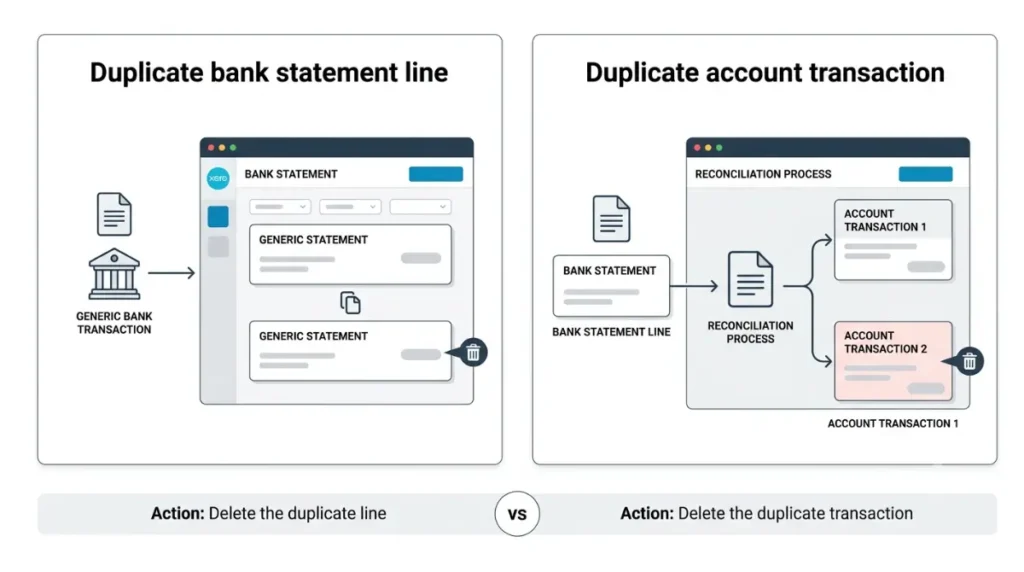
If you created the second entry yourself during reconciliation, deleting a statement line is the wrong move.
🛟 Back This Up First: Deleting an account transaction removes the record. Where it was a payment against an invoice or bill, note the document number before you delete — you will be re-applying it.
Xero states the rule plainly in its guide to unreconciling an account transaction, retrieved 7 September 2026: where you created a duplicate transaction during reconciliation, delete the account transaction instead of unreconciling it.
| Action | What it does | When Xero documents using it |
|---|---|---|
| Unreconcile | Breaks the link only; both records stay in place | Reconciled to the wrong line (retrieved 7 Sep 2026) |
| Remove & Redo | Deletes the payment or transaction | Matched to a spend or receive money transaction (retrieved 7 Sep 2026) |
| Delete transaction | Removes the duplicate you created | You made the second entry yourself (retrieved 7 Sep 2026) |
Unreconciling requires the administrator, or standard plus bank accounts, user role. One documented catch: where the transaction was manually marked as reconciled, unreconciling it deletes the corresponding statement line as well.
If the line won’t delete, or you deleted the wrong one
Four states change what you can do. Find yours before trying again.
The line is already reconciled
Xero’s guidance on fixing an incorrectly reconciled statement line, retrieved 7 September 2026, routes through the matched transaction: open it, click Options, then Remove & Redo where it is matched to a spend or receive money transaction, or Unreconcile where it is matched to an invoice or bill payment.
Xero already removed it
Run the Statement Exceptions report in the Bank Reconciliation report pack. It shows lines Xero identified as potential duplicates and whether they were deleted. Deleted is a status on the Bank Statements tab, and a line deleted in error can be restored there.
The period is closed or already filed
⚠️ This Costs You: Deleting a line inside a period you have reported for VAT, GST, BAS or sales tax changes figures already submitted to a tax authority. Xero documents lock dates as stopping transactions being raised or edited in past periods, retrieved 7 September 2026. Xero’s documentation does not state whether a lock date also blocks deleting a bank statement line, and we could not verify it. Stop here and ask whoever files your returns. That is where self-service ends on this problem — beyond it, an organisation administrator, your accountant, or Xero Support takes over.
Stopping duplicates from coming back
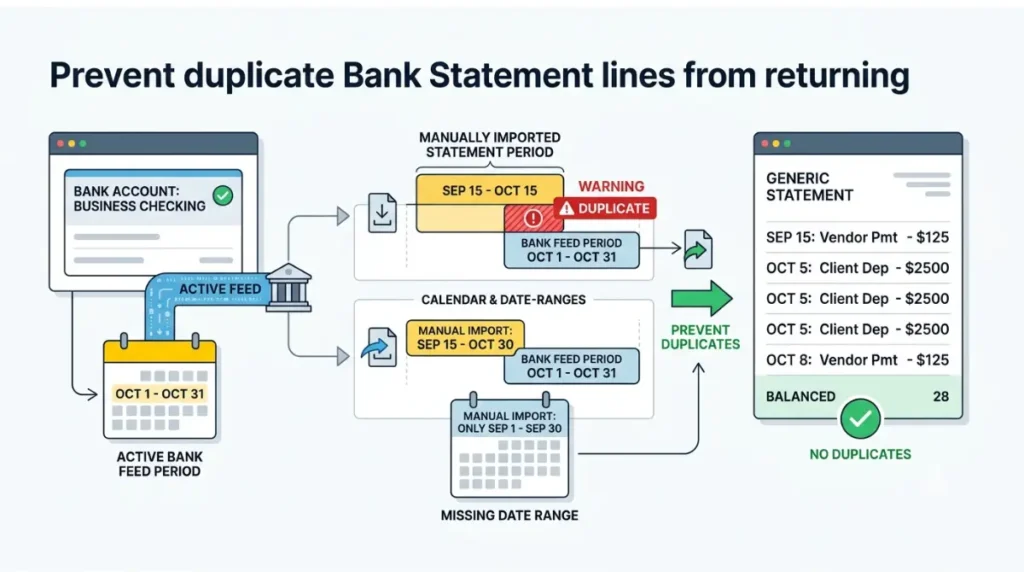
Xero has confirmed it will not delete duplicates automatically (Xero staff response, 9 March 2023), so prevention is the only thing that saves you the cleanup twice.
✅ Do This: Stop importing statements for any period your feed already covers. Import only to fill a gap before the feed started, and match the date range exactly.
Compare your statement balance against the balance in Xero once a month rather than once a year. Where lines stop arriving instead of arriving twice, that is the opposite failure — our guide to a Xero bank feed that has stopped updating covers it.
🧾 Not Tested: We hold no Xero organisation with a connected bank feed, so no step above was performed. Every path is taken from Xero’s published documentation on the date shown beside it. What we could not verify: the exact button labels inside the Bank Statements tab, whether a lock date blocks deleting a statement line, and the steps for resolving a duplicated bank account.
Common questions about duplicates in Xero
1. Does Xero remove duplicate bank lines automatically?
No. Xero has confirmed it will not delete duplicate statement lines for you; it flags them in a report instead.
2. What is the Duplicate Statement Lines report?
A Xero report comparing the date and amount of statement lines in one bank account, flagging potential duplicates. Partial matches are excluded.
3.Can I delete a reconciled statement line?
Xero’s documented route goes through the matched account transaction first — open it, click Options, then Unreconcile or Remove & Redo.
4. Should I unreconcile or delete?
Unreconcile keeps both records and breaks the link. Where you created the duplicate yourself while reconciling, Xero says delete the transaction.
5. Can I restore a bank statement line I deleted by mistake?
Yes. Deleted is a status on the Bank Statements tab, and Xero documents restoring a line deleted in error there.
6. What if the whole statement imported twice?
Delete the entire statement rather than the individual lines, then confirm your statement balance matches the balance in Xero.
7. Why doesn’t my Xero statement balance match my bank?
Duplicates are one cause. Compare the statement balance against the balance in Xero, refreshing a Yodlee feed first.
8. What if the same bank account was added twice?
That is a separate problem with its own Xero guidance. This article covers duplicate lines and duplicate transactions, not duplicate accounts.
9. Is it safe to delete a line in a period I’ve already filed?
Ask whoever files your returns first. Deleting inside a reported period changes figures already submitted to a tax authority.
Before you close the tab
Run the Duplicate Statement Lines report before deleting anything, delete from the Bank Statements tab only where the status reads Unreconciled, and check the two balances afterwards. If you created the second entry yourself, the transaction goes, not the line. Where the period is already filed, stop and ask your accountant.